Master Home Office Desk Organization in 2026

The desk in many homes no longer serves as a spare surface for bills, homework, or the occasional laptop. It has become the place where meetings happen, decisions get made, and long workdays unfold. That shift explains why so many people now feel the strain of a workspace that looks manageable at first glance but functions poorly by noon. Papers drift into stacks, chargers coil into knots, and the desk starts carrying far more than the work itself.
That change happened quickly. A Pew Research Center study cited by Loctek reports that 20% of people worked from home before the pandemic, but 71% were working from home by December 2020, and over 88% of remote workers relied on a desk, making it the center of the modern workday (remote work and desk-use findings). A home office now needs to perform like a real workspace, not a temporary corner.
Most organization advice still treats the problem as a matter of bins, trays, and quick cosmetic fixes. That approach rarely lasts. Good home office desk organization starts with a more durable idea. The desk itself should support the way work happens. Storage should be intentional. The room should feel settled, not improvised.
A thoughtful workspace begins with a strong foundation, and that usually means furniture chosen for the long term rather than for the next tidy-up session. Readers looking for that broader design perspective can also explore inspiring home office ideas that connect function with a more finished interior.
Table of Contents
- Introduction
- Establish Your Foundation with a Purposeful Declutter
- Design Your Workflow with Strategic Desk Zones
- Select Enduring Storage and Solid Wood Furniture
- Tame Your Technology and Conceal Cables
- Maintain Your Space with Ergonomics and Daily Routines
Introduction
A disorganized home office rarely begins as a major problem. It starts with one unopened envelope, an extra notebook, a charging cable left out for convenience, and a coffee mug that stays overnight. By the end of the week, the desktop has lost its hierarchy. Everything looks equally important, which means nothing is placed where it should be.
That visual noise has a design problem underneath it. Most desks are asked to do too much without a plan for where work should happen, where tools should rest, and where the overflow should go. When the furniture lacks structure, the person using it has to create structure manually every day. That's exhausting.
A well-organized desk shouldn't feel stripped bare. It should feel calm, deliberate, and ready.
Home office desk organization works better when it's treated as part of the room's architecture. The desk is the anchor. Storage supports it. The objects on top earn their place. Once that shift happens, the space starts to function with less effort.
Establish Your Foundation with a Purposeful Declutter
The fastest way to improve a desk is also the least glamorous. Everything has to come off the surface first. Not shifted into neater piles. Removed.

A messy desk carries a real business cost. Brother International estimated that disorganized desks and time spent searching for lost items cost corporate America $177 billion annually, and the same discussion notes that assigning every item a fixed home and doing a brief reset works better than occasional deep-cleaning purges (desk clutter cost and habit-based fix). That logic applies just as clearly at home.
Clear the desk completely
A full reset exposes what belongs in the workspace. Once the surface is empty, it becomes easier to see which objects support daily work and which ones have accumulated.
A practical first pass can be as simple as this:
- Keep nearby if the item is used during a normal workday
- Store elsewhere if it's necessary but not needed constantly
- Discard or recycle if it's broken, outdated, duplicated, or irrelevant
For readers who want a simple working checklist before the reset begins, Endless Storage office organization help offers a useful prompt list for sorting paper, supplies, and old office overflow.
Sort by use, not by guilt
People often keep items on a desk because they feel they should use them. Extra planners, old notebooks, backup chargers, unopened stationery, and stacks of reference papers all survive for emotional reasons long after they've stopped serving the work.
Practical rule: If an item doesn't support the current workflow, it doesn't belong in the primary workspace.
The declutter stage also reveals where the room itself is failing. If paper has nowhere to go, the issue isn't discipline. It's missing storage. If cables always return to the top, routing hasn't been solved. If supplies crowd the desktop, the furniture may not be doing enough.
That's why the reset matters. It isn't just a cleaning exercise. It's the diagnostic step that shows what kind of organization system the room needs. More ideas for solving persistent overflow can be found in smart ways to solve clutter issues once and for all.
Design Your Workflow with Strategic Desk Zones
Many people organize a desk by category. Pens in one cup, paper in one tray, chargers in one basket. That seems logical, but it often ignores how work moves across the desk. A more durable approach organizes by reach and frequency.
Productivity guidance around the three-zone desk layout recommends placing the monitor and keyboard in the primary zone directly in front, keeping frequent-use items in the secondary zone within arm's reach, and moving everything else to the tertiary zone (three-zone layout guidance). This reduces both visual and physical clutter because placement follows actual workflow.
The desk should match the work
A home office used for design review, scheduling, writing, accounting, or video calls won't have the same rhythm. The zone method works because it adapts. A person who writes by hand may keep a notebook in the secondary zone. Someone who takes frequent calls may keep a headset there instead. What matters is that the primary zone remains disciplined.
When that zone gets crowded with decorative storage, stacked papers, extra devices, or office supplies, the desk starts forcing awkward movement. Reaching around clutter all day is a subtle drain on focus.
The most useful desk isn't the one with the emptiest surface. It's the one where every movement feels expected.
This is also where furniture starts to matter. A well-proportioned solid wood desk, especially one with drawers sized for the tools used every day, does more for organization than a collection of add-on accessories. Readers considering a more permanent setup can explore home office furniture ideas for layout and function.
The Three-Zone System for Desk Organization
| Zone | Location | Items to Place Here |
|---|---|---|
| Primary Zone | Directly in front of the body | Keyboard, mouse, main monitor |
| Secondary Zone | Within easy arm's reach | Notebook, task pad, phone, frequently used pen |
| Tertiary Zone | Outside immediate reach or off the desktop | Reference files, extra supplies, archived paper, infrequently used devices |
The discipline is simple. The closer an item is to the body, the more often it should be used. That one rule tends to solve half the clutter on its own.
Select Enduring Storage and Solid Wood Furniture
The best home office desk organization doesn't begin with organizers. It begins with furniture that was designed to hold work properly.
A solid hardwood desk in cherry, oak, maple, or walnut brings more than visual warmth. It provides weight, stability, and storage that feels integrated rather than improvised. Drawers glide with purpose. The top has enough presence to hold a monitor and daily tools without feeling fragile. The room reads as furnished, not assembled.
Choose built-in storage over desktop clutter
Desktop organizers often solve one problem by creating another. They consume work surface, interrupt sightlines, and encourage keeping too many small items visible. Built-in storage does the opposite. It protects the desktop.
A stronger storage hierarchy usually looks like this:
- Top drawer use for objects handled every day, such as pens, charging cords, and note cards
- Lower drawer use for paper supplies, documents in process, and device accessories
- Nearby casegoods for tertiary storage, including printers, archived files, and reference materials
That hierarchy also supports the quality of the room. A bench-made desk paired with a matching credenza or bookcase creates continuity. It replaces scattered solutions with one coordinated system.
For homeowners who want to plan around room size, finish, and working style, solid wood home office furniture options provide a useful starting point. In practice, a showroom-based design process can help match desk depth, drawer layout, and wood species to the demands of daily work. Vinson Fine Furniture also offers an in-store Design Studio, complimentary consultations, and a Custom Order Program with brands such as Canadel, Mavin, and Smith Brothers, including finish and configuration tools that help visualize a more customized office.
Treat cable planning as part of the furniture decision
Tech clutter is usually treated as an accessory problem, but it's often a furniture problem first. If a desk has no path for cords, chargers, and power access, cables will surface no matter how often they're tidied.
When selecting a desk and supporting storage, it helps to look for:
- Rear access points that allow cords to drop cleanly without crossing the work surface
- Drawer adjacency that keeps chargers and small peripherals near the point of use
- Companion storage for docking stations, backup drives, and paper that doesn't belong on top
A beautiful desk should do more than look substantial. It should absorb the practical demands of modern work with enough grace that the room still feels like part of the home.
Tame Your Technology and Conceal Cables
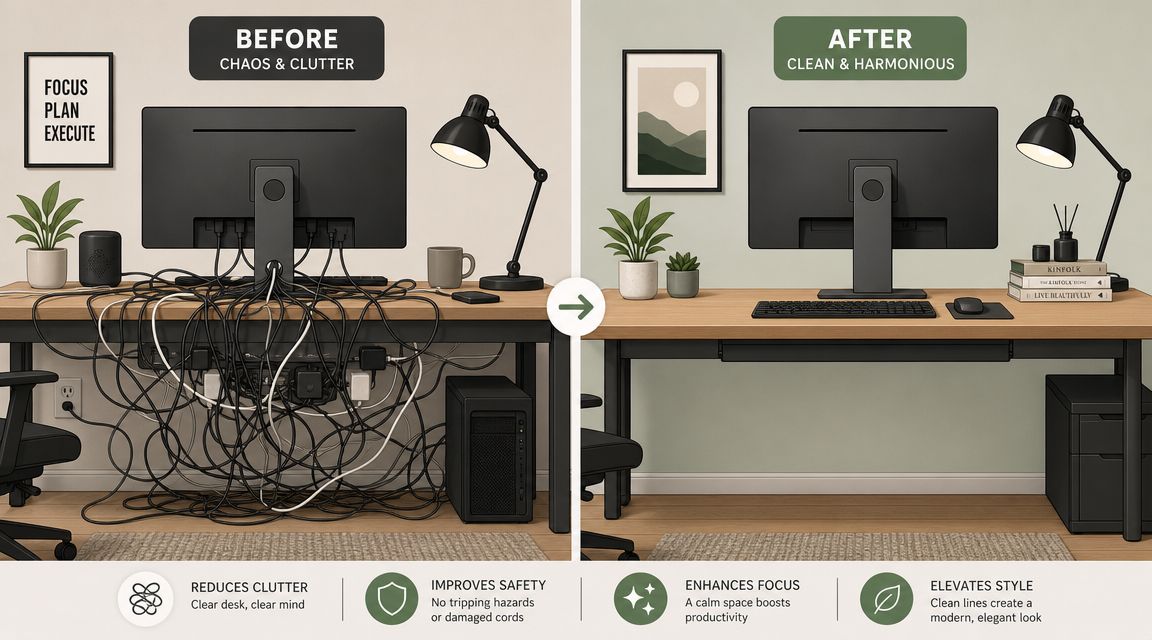
The desk can be perfectly organized at eye level and still feel chaotic if the underside is a web of wires. Cables don't just create visual mess. They steal usable surface area, complicate cleaning, and make device changes more frustrating than they need to be.
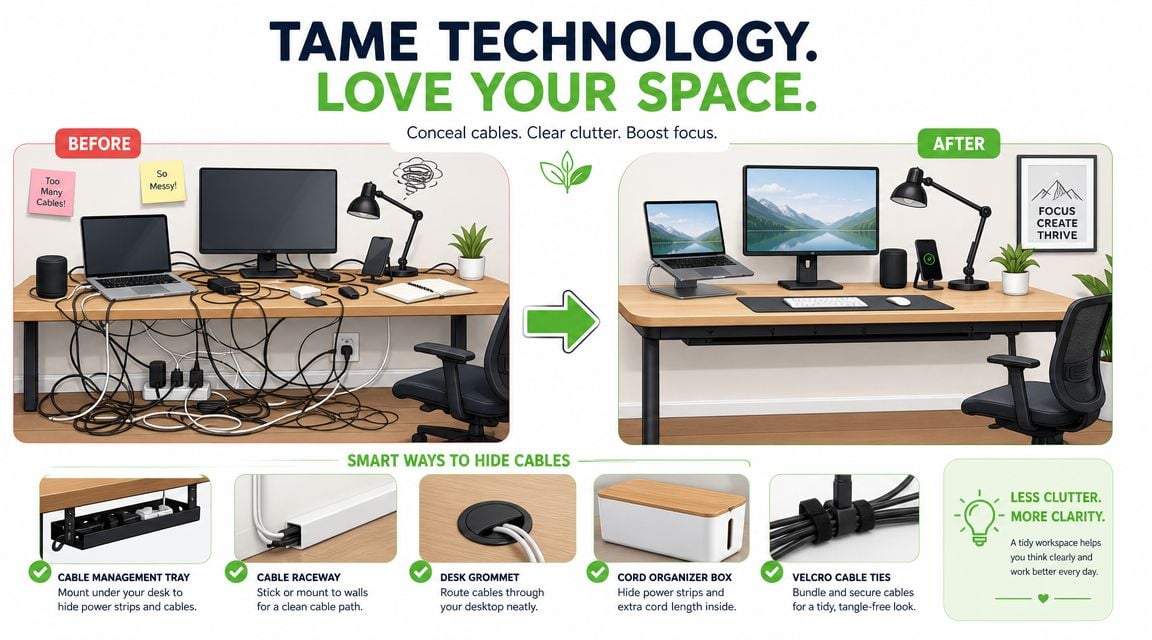
Guidance on desk organization increasingly notes that technology and cable management are often overlooked, even though the primary issue for many remote workers is integrating a laptop, monitor, charger, docking station, and peripherals without creating a wire nest. That same guidance points to integrated furniture with hidden routing as a more permanent answer than add-on organizers (technology and cable management guidance).
Build one path for every cord
The most effective cable systems are boring in the best possible way. Every cord has one route, one destination, and one reason to stay there.
A workable setup usually includes:
- An under-desk tray to lift the power strip off the floor
- Clips or sleeves to guide cords down the back edge rather than across the top
- A dedicated charging spot inside a drawer or in a nearby cabinet for smaller devices
- A pouch or contained drawer section for spare cables that aren't in active use
Loose cable storage is where many desks fail. Backup chargers, adapters, earbuds, and device cords shouldn't drift between drawers. They need one assigned container.
Use a daily reset to protect the system
Cable order only lasts if devices return to the same resting places. A laptop that gets plugged in at three different outlets during the week will eventually bring disorder back with it.
Small routines preserve design decisions. Without them, even good furniture starts carrying bad habits.
That reset doesn't need to be elaborate. Return the laptop to its dock or shelf. Coil the charging cord the same way each evening. Put the headset back in its drawer. A few repeated motions keep technology from reclaiming the desktop.
Maintain Your Space with Ergonomics and Daily Routines
A desk can look immaculate and still be uncomfortable to use. That's the blind spot in many organization plans. They prioritize visual neatness over physical sustainability.
Guidance on desk setup and posture stresses that organization and ergonomics are inseparable. Essential items should stay close enough to reduce strain, and a sustainable setup balances a clean appearance with the demands of a full workday (ergonomic desk organization guidance). An empty desk isn't automatically a good desk.
Keep the desktop useful, not empty
The goal is a surface that supports posture and reach. The monitor should sit at a comfortable viewing height. The keyboard and mouse should allow a relaxed arm position. Frequently used objects should be close enough that the body doesn't twist, stretch, or hunch to access them.
Supportive seating matters just as much. A desk organized for long hours needs a chair that encourages stable posture and easy movement. That's one reason many homeowners eventually move beyond makeshift task seating and start looking at more substantial office chairs, swivel chairs, rockers, or gliders that feel better built and better finished within the room. For anyone reviewing seating options, writing desk chairs and office seating ideas can help narrow what belongs in a dedicated workspace.
For screen-heavy work, visual comfort deserves a place in the routine too. Readers spending long stretches in front of a monitor may also want to find the best screen glasses as part of a broader effort to reduce eye strain during the workday.
End the day with a short restoration routine
A strong system survives because it repeats. The end-of-day reset is what keeps organization from becoming a weekend project.
A useful closing routine might include:
- Return paper to its file, tray, or drawer
- Reconnect devices to their charging spot
- Clear the primary zone so the next morning starts with a ready surface
- Leave out only tomorrow's first task if that helps create momentum
That habit keeps the room aligned with the way it was designed to function. The desk remains a working piece of furniture, not a holding area for unfinished decisions.
A well-organized home office should feel settled, capable, and built to last. For homeowners ready to create a workspace around solid hardwood, custom storage, and a more enduring design plan, Vinson Fine Furniture offers an Easton Town Center destination with an in-store Design Studio, complimentary consultations, custom-order options from brands including Smith Brothers, Canadel, and Mavin, a Low Price Guarantee with a 110% refund on qualifying local price differences, a Clearance Gallery with savings up to 70%, and white-glove delivery for a finished result that feels considered from the start.